
Keyzino on Mobile: Play in Your Browser
Keyzino opens in your smartphone or tablet browser, with no download. Games, cashier and 24/7 chat in one place. Adults only.

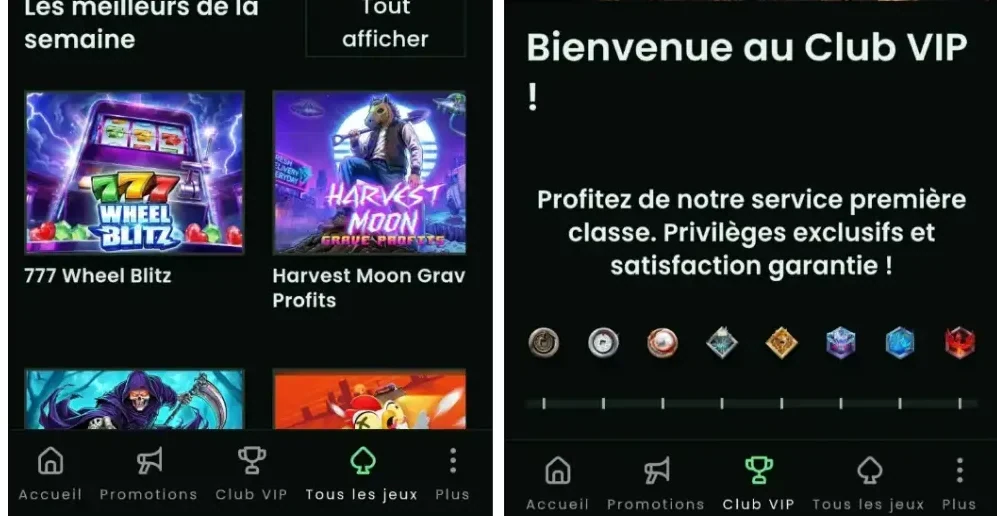
Keyzino is played in the browser on your smartphone, tablet or computer, with no download. The same platform adapts to every screen for a smooth, fast experience.
A mobile version in your browser
Mobile access is through the site itself: you open the address in your browser and find your account. No files to install, no app permissions to grant. Site updates apply from your next login.
The advantages of the browser format
- No installation or app to manage
- A single version of the site for all devices
- The same account on desktop, laptop, tablet and smartphone
Features available on mobile
The mobile casino brings the site's main sections together in a single account.
- Registration and login
- Slots, jackpots, scratch cards, table games and live casino
- Cashier: Visa and Mastercard with 3DS, Neosurf, Bitcoin
- Daily promotions and an eight-level VIP club
- 24/7 live chat and help centre
Mobile or desktop: comparison
Both share the same account and balance. The difference lies in depositing mid-game.
| Criterion | Mobile (browser) | Desktop |
|---|---|---|
| Access | Smartphone or tablet browser | Browser |
| Installation | None | None |
| Updates | On the site's side | On the site's side |
| Deposits | Cashier | Cashier and "Quick Deposit" field in the game window |
| Support | 24/7 chat | 24/7 chat |
Shortcut on Android
A home screen shortcut opens the site in one tap, just like an app.
- Open the Keyzino site in Chrome.
- Tap the menu (three dots) in the top right.
- Select "Add to Home screen".
- Confirm: the icon appears among your apps.
Shortcut on iPhone and iPad
On iOS, this is done from Safari.
- Open the site in Safari.
- Tap the Share icon.
- Choose "Add to Home Screen".
- Confirm with "Add".
Compatible devices
The platform is designed for all screen sizes, with an internet connection.
| Device | Access |
|---|---|
| Desktop computer | Browser |
| Laptop | Browser |
| Tablet | Browser |
| Smartphone | Browser |
Security on mobile
Account protections are the same on every device.
- Advanced encryption technology
- 3DS on card deposits
- Identity verification before withdrawal
- One account per person
- No data passed on to third parties without consent
Updates and troubleshooting
The browser version evolves with the site: nothing to install on your end. If you run into a problem, the Technical Support section of the help centre covers several cases.
- Game frozen
- Missing free spins
- Login problem
- Password
The 24/7 live chat and kundenservice@keyzino.com take over if the FAQ isn't enough.
Mobile version FAQ
Do I need to download an app?
No. The site opens in your browser, and a home screen shortcut gives direct access.
Does the site work on iPhone and Android?
Yes, via the browser: Safari on iPhone and iPad, Chrome on Android.
Is quick deposit available on mobile?
The "Quick Deposit" field is listed for the desktop version. On mobile, deposits go through the cashier and are credited instantly.
Is my account the same on all devices?
Yes, one account per person, usable on desktop, tablet and smartphone.
Adults only. Gambling involves financial risk: set yourself limits and take breaks.